
diff options
| author | MohamedBassem <me@mbassem.com> | 2024-08-31 17:44:11 +0000 |
|---|---|---|
| committer | MohamedBassem <me@mbassem.com> | 2024-08-31 17:44:11 +0000 |
| commit | 621c32961d9be77decf5997324d654dbcbf85947 (patch) | |
| tree | 1b893dd10e329748614b14cf7a7e0f6886be439f /docs/versioned_docs | |
| parent | 2fb85590271476a40c3d0d6a9cc4683576ff6074 (diff) | |
| download | karakeep-621c32961d9be77decf5997324d654dbcbf85947.tar.zst | |
docs: Publish the docs for version 0.16.0
Diffstat (limited to 'docs/versioned_docs')
16 files changed, 665 insertions, 0 deletions
diff --git a/docs/versioned_docs/version-v0.16.0/01-intro.md b/docs/versioned_docs/version-v0.16.0/01-intro.md new file mode 100644 index 00000000..03c0c823 --- /dev/null +++ b/docs/versioned_docs/version-v0.16.0/01-intro.md @@ -0,0 +1,37 @@ +--- +slug: / +--- + +# Introduction + +Hoarder is an open source "Bookmark Everything" app that uses AI for automatically tagging the content you throw at it. The app is built with self-hosting as a first class citizen. + +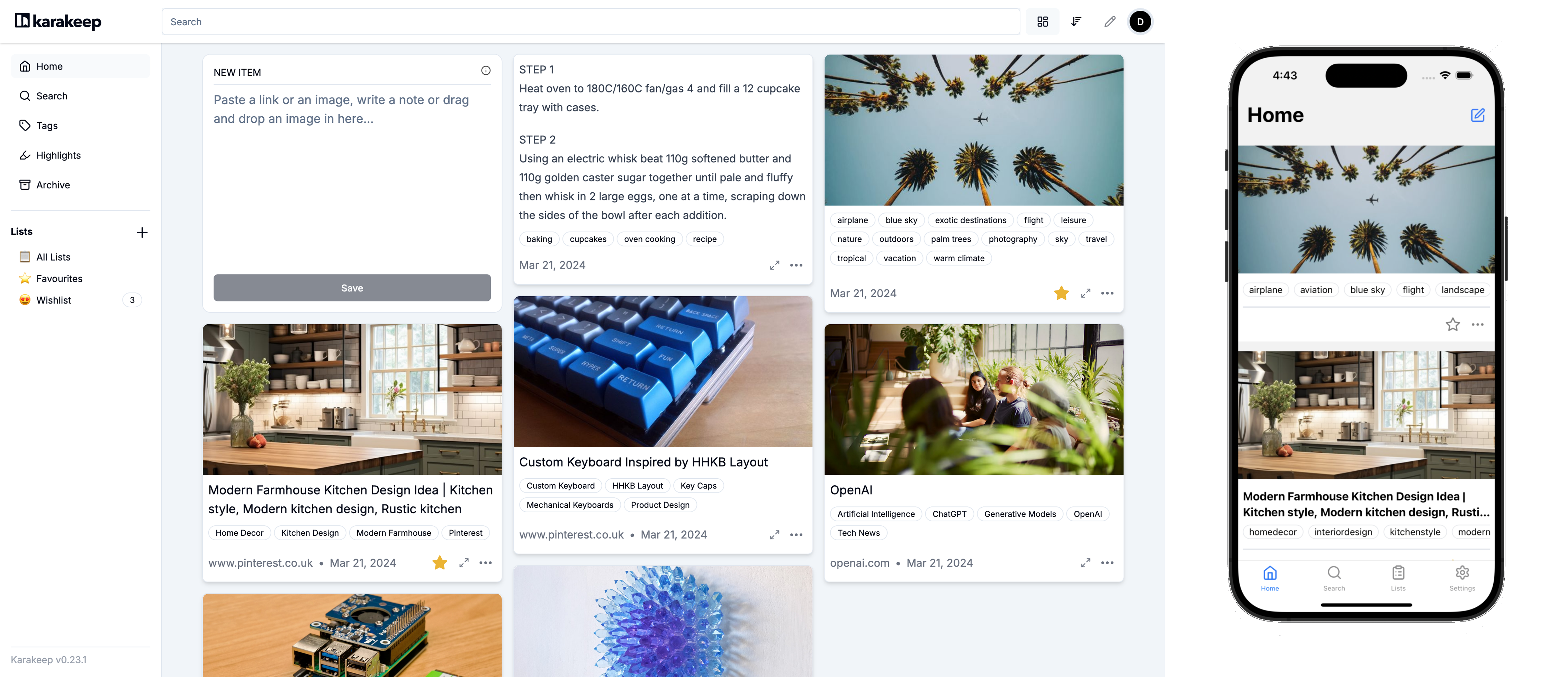 + + +## Features + +- 🔗 Bookmark links, take simple notes and store images and pdfs. +- ⬇️ Automatic fetching for link titles, descriptions and images. +- 📋 Sort your bookmarks into lists. +- 🔎 Full text search of all the content stored. +- ✨ AI-based (aka chatgpt) automatic tagging. With supports for local models using ollama! +- 🔖 [Chrome plugin](https://chromewebstore.google.com/detail/hoarder/kgcjekpmcjjogibpjebkhaanilehneje) and [Firefox addon](https://addons.mozilla.org/en-US/firefox/addon/hoarder/) for quick bookmarking. +- 📱 An [iOS app](https://apps.apple.com/us/app/hoarder-app/id6479258022), and an [Android app](https://play.google.com/store/apps/details?id=app.hoarder.hoardermobile&pcampaignid=web_share). +- 🌙 Dark mode support. +- 💾 Self-hosting first. +- [Planned] Downloading the content for offline reading. + +**⚠️ This app is under heavy development and it's far from stable.** + + +## Demo + +You can access the demo at [https://try.hoarder.app](https://try.hoarder.app). Login with the following creds: + +``` +email: demo@hoarder.app +password: demodemo +``` + +The demo is seeded with some content, but it's in read-only mode to prevent abuse. diff --git a/docs/versioned_docs/version-v0.16.0/02-Installation/01-docker.md b/docs/versioned_docs/version-v0.16.0/02-Installation/01-docker.md new file mode 100644 index 00000000..89fa6538 --- /dev/null +++ b/docs/versioned_docs/version-v0.16.0/02-Installation/01-docker.md @@ -0,0 +1,86 @@ +# Docker Compose [Recommended] + +### Requirements + +- Docker +- Docker Compose + +### 1. Create a new directory + +Create a new directory to host the compose file and env variables. + +### 2. Download the compose file + +Download the docker compose file provided [here](https://github.com/hoarder-app/hoarder/blob/main/docker/docker-compose.yml). + +``` +wget https://raw.githubusercontent.com/hoarder-app/hoarder/main/docker/docker-compose.yml +``` + +### 3. Populate the environment variables + +To configure the app, create a `.env` file in the directory and add this minimal env file: + +``` +HOARDER_VERSION=release +NEXTAUTH_SECRET=super_random_string +MEILI_MASTER_KEY=another_random_string +NEXTAUTH_URL=http://localhost:3000 +``` + +You **should** change the random strings. You can use `openssl rand -base64 36` to generate the random strings. You should also change the `NEXTAUTH_URL` variable to point to your server address. + +Using `HOARDER_VERSION=release` will pull the latest stable version. You might want to pin the version instead to control the upgrades (e.g. `HOARDER_VERSION=0.10.0`). Check the latest versions [here](https://github.com/hoarder-app/hoarder/pkgs/container/hoarder-web). + +Persistent storage and the wiring between the different services is already taken care of in the docker compose file. + +Keep in mind that every time you change the `.env` file, you'll need to re-run `docker compose up`. + +If you want more config params, check the config documentation [here](/configuration). + +### 4. Setup OpenAI + +To enable automatic tagging, you'll need to configure OpenAI. This is optional though but hightly recommended. + +- Follow [OpenAI's help](https://help.openai.com/en/articles/4936850-where-do-i-find-my-openai-api-key) to get an API key. +- Add the OpenAI API key to the env file: + +``` +OPENAI_API_KEY=<key> +``` + +Learn more about the costs of using openai [here](/openai). + +<details> + <summary>[EXPERIMENTAL] If you want to use Ollama (https://ollama.com/) instead for local inference.</summary> + + **Note:** The quality of the tags you'll get will depend on the quality of the model you choose. Running local models is a recent addition and not as battle tested as using openai, so proceed with care (and potentially expect a bunch of inference failures). + + - Make sure ollama is running. + - Set the `OLLAMA_BASE_URL` env variable to the address of the ollama API. + - Set `INFERENCE_TEXT_MODEL` to the model you want to use for text inference in ollama (for example: `mistral`) + - Set `INFERENCE_IMAGE_MODEL` to the model you want to use for image inference in ollama (for example: `llava`) + - Make sure that you `ollama pull`-ed the models that you want to use. + + +</details> + +### 5. Start the service + +Start the service by running: + +``` +docker compose up -d +``` + +Then visit `http://localhost:3000` and you should be greated with the Sign In page. + +### [Optional] 6. Setup quick sharing extensions + +Go to the [quick sharing page](/quick-sharing) to install the mobile apps and the browser extensions. Those will help you hoard things faster! + +## Updating + +Updating hoarder will depend on what you used for the `HOARDER_VERSION` env variable. +- If you pinned the app to a specific version, bump the version and re-run `docker compose up -d`. This should pull the new version for you. +- If you used `HOARDER_VERSION=release`, you'll need to force docker to pull the latest version by running `docker compose up --pull always -d`. diff --git a/docs/versioned_docs/version-v0.16.0/02-Installation/02-unraid.md b/docs/versioned_docs/version-v0.16.0/02-Installation/02-unraid.md new file mode 100644 index 00000000..b879f900 --- /dev/null +++ b/docs/versioned_docs/version-v0.16.0/02-Installation/02-unraid.md @@ -0,0 +1,21 @@ +# Unraid + +## Docker Compose Manager Plugin (Recommended) + +You can use [Docker Compose Manager](https://forums.unraid.net/topic/114415-plugin-docker-compose-manager/) plugin to deploy Hoarder using the official docker compose file provided [here](https://github.com/hoarder-app/hoarder/blob/main/docker/docker-compose.yml). After creating the stack, you'll need to setup some env variables similar to that from the docker compose installation docs [here](/Installation/docker#3-populate-the-environment-variables). + +## Community Apps + +:::info +The community application template is maintained by the community. +::: + +Hoarder can be installed on Unraid using the community application plugins. Hoarder is a multi-container service, and because unraid doesn't natively support that, you'll have to install the different pieces as separate applications and wire them manually together. + +Here's a high level overview of the services you'll need: + +- **Hoarder** ([Support post](https://forums.unraid.net/topic/165108-support-collectathon-hoarder/)): Hoarder's main web app. +- **hoarder-worker** ([Support post](https://forums.unraid.net/topic/165108-support-collectathon-hoarder/)): Hoarder's background workers (for running the AI tagging, fetching the content, etc). +- **Redis**: Currently used for communication between the web app and the background workers. +- **Browserless** ([Support post](https://forums.unraid.net/topic/130163-support-template-masterwishxbrowserless/)): The chrome headless service used for fetching the content. Hoarder's official docker compose doesn't use browserless, but it's currently the only headless chrome service available on unraid, so you'll have to use it. +- **MeiliSearch** ([Support post](https://forums.unraid.net/topic/164847-support-collectathon-meilisearch/)): The search engine used by Hoarder. It's optional but highly recommended. If you don't have it set up, search will be disabled. diff --git a/docs/versioned_docs/version-v0.16.0/02-Installation/03-archlinux.md b/docs/versioned_docs/version-v0.16.0/02-Installation/03-archlinux.md new file mode 100644 index 00000000..37ada2fa --- /dev/null +++ b/docs/versioned_docs/version-v0.16.0/02-Installation/03-archlinux.md @@ -0,0 +1,48 @@ +# Arch Linux + +## Installation + +> [Hoarder on AUR](https://aur.archlinux.org/packages/hoarder) is not maintained by the hoarder official. + +1. Install hoarder + + ```shell + paru -S hoarder + ``` + +2. (**Optional**) Install optional dependencies + + ```shell + # meilisearch: for full text search + paru -S meilisearch + + # ollama: for automatic tagging + paru -S ollama + + # hoarder-cli: hoarder cli tool + paru -S hoarder-cli + ``` + + You can use Open-AI instead of `ollama`. If you use `ollama`, you need to download the ollama model. Please refer to: [https://ollama.com/library](https://ollama.com/library). + +3. Set up + + Environment variables can be set in `/etc/hoarder/hoarder.env` according to [configuration page](/configuration). **The environment variables that are not specified in `/etc/hoarder/hoarder.env` need to be added by yourself.** + +4. Enable service + + ```shell + sudo systemctl enable --now hoarder.target + ``` + + Then visit `http://localhost:3000` and you should be greated with the Sign In page. + +## Services and Ports + +`hoarder.target` include 3 services: `hoarder-web.service`, `hoarder-works.service`, `hoarder-browser.service`. + +- `hoarder-web.service`: Provide hoarder WebUI service, use `3000` port default. + +- `hoarder-works.service`: Provide hoarder works service, no port. + +- `hoarder-browser.service`: Provide browser headless service, use `9222` port default. diff --git a/docs/versioned_docs/version-v0.16.0/02-Installation/04-kubernetes.md b/docs/versioned_docs/version-v0.16.0/02-Installation/04-kubernetes.md new file mode 100644 index 00000000..2a418227 --- /dev/null +++ b/docs/versioned_docs/version-v0.16.0/02-Installation/04-kubernetes.md @@ -0,0 +1,71 @@ +# Kubernetes + +### Requirements + +- A kubernetes cluster +- kubectl +- kustomize + +### 1. Get the deployment manifests + +You can clone the repository and copy the `/kubernetes` directory into another directory of your choice. + +### 2. Populate the environment variables + +To configure the app, edit the configuration in `.env`. + + +You **should** change the random strings. You can use `openssl rand -base64 36` to generate the random strings. You should also change the `NEXTAUTH_URL` variable to point to your server address. + +Using `HOARDER_VERSION=release` will pull the latest stable version. You might want to pin the version instead to control the upgrades (e.g. `HOARDER_VERSION=0.10.0`). Check the latest versions [here](https://github.com/hoarder-app/hoarder/pkgs/container/hoarder-web). + +### 3. Setup OpenAI + +To enable automatic tagging, you'll need to configure OpenAI. This is optional though but hightly recommended. + +- Follow [OpenAI's help](https://help.openai.com/en/articles/4936850-where-do-i-find-my-openai-api-key) to get an API key. +- Add the OpenAI API key to the `.env` file: + +``` +OPENAI_API_KEY=<key> +``` + +Learn more about the costs of using openai [here](/openai). + +<details> + <summary>[EXPERIMENTAL] If you want to use Ollama (https://ollama.com/) instead for local inference.</summary> + + **Note:** The quality of the tags you'll get will depend on the quality of the model you choose. Running local models is a recent addition and not as battle tested as using openai, so proceed with care (and potentially expect a bunch of inference failures). + + - Make sure ollama is running. + - Set the `OLLAMA_BASE_URL` env variable to the address of the ollama API. + - Set `INFERENCE_TEXT_MODEL` to the model you want to use for text inference in ollama (for example: `mistral`) + - Set `INFERENCE_IMAGE_MODEL` to the model you want to use for image inference in ollama (for example: `llava`) + - Make sure that you `ollama pull`-ed the models that you want to use. + + +</details> + +### 4. Deploy the service + +Deploy the service by running: + +``` +make deploy +``` + +### 5. Access the service + +By default, these manifests expose the application as a LoadBalancer Service. You can run `kubectl get services` to identify the IP of the loadbalancer for your service. + +Then visit `http://<loadbalancer-ip>:3000` and you should be greated with the Sign In page. + +> Note: Depending on your setup you might want to expose the service via an Ingress, or have a different means to access it. + +### [Optional] 6. Setup quick sharing extensions + +Go to the [quick sharing page](/quick-sharing) to install the mobile apps and the browser extensions. Those will help you hoard things faster! + +## Updating + +Edit the `HOARDER_VERSION` variable in the `kustomization.yaml` file and run `make clean deploy`. diff --git a/docs/versioned_docs/version-v0.16.0/03-configuration.md b/docs/versioned_docs/version-v0.16.0/03-configuration.md new file mode 100644 index 00000000..60343345 --- /dev/null +++ b/docs/versioned_docs/version-v0.16.0/03-configuration.md @@ -0,0 +1,52 @@ +# Configuration + +The app is mainly configured by environment variables. All the used environment variables are listed in [packages/shared/config.ts](https://github.com/hoarder-app/hoarder/blob/main/packages/shared/config.ts). The most important ones are: + +| Name | Required | Default | Description | +| ------------------------- | ------------------------------------- | --------- | ---------------------------------------------------------------------------------------------------------------------------------------------- | +| DATA_DIR | Yes | Not set | The path for the persistent data directory. This is where the db and the uploaded assets live. | +| NEXTAUTH_URL | Yes | Not set | Should point to the address of your server. The app will function without it, but will redirect you to wrong addresses on signout for example. | +| NEXTAUTH_SECRET | Yes | Not set | Random string used to sign the JWT tokens. Generate one with `openssl rand -base64 36`. | +| REDIS_HOST | Yes | localhost | The address of redis used by background jobs | +| REDIS_PORT | Yes | 6379 | The port of redis used by background jobs | +| REDIS_DB_IDX | No | Not set | The db idx to use with redis. It defaults to 0 (in the client) so you don't usually need to set it unless you explicitly want another db. | +| REDIS_PASSWORD | No | Not set | The password used for redis authentication. It's not required if your redis instance doesn't require AUTH. | +| MEILI_ADDR | No | Not set | The address of meilisearch. If not set, Search will be disabled. E.g. (`http://meilisearch:7700`) | +| MEILI_MASTER_KEY | Only in Prod and if search is enabled | Not set | The master key configured for meilisearch. Not needed in development environment. Generate one with `openssl rand -base64 36` | +| DISABLE_SIGNUPS | No | false | If enabled, no new signups will be allowed and the signup button will be disabled in the UI | +| MAX_ASSET_SIZE_MB | No | 4 | Sets the maximum allowed asset size (in MB) to be uploaded | +| DISABLE_NEW_RELEASE_CHECK | No | false | If set to true, latest release check will be disabled in the admin panel. | + +## Inference Configs (For automatic tagging) + +Either `OPENAI_API_KEY` or `OLLAMA_BASE_URL` need to be set for automatic tagging to be enabled. Otherwise, automatic tagging will be skipped. + +:::warning + +- The quality of the tags you'll get will depend on the quality of the model you choose. +- Running local models is a recent addition and not as battle tested as using OpenAI, so proceed with care (and potentially expect a bunch of inference failures). + ::: + +| Name | Required | Default | Description | +| --------------------- | -------- | ------------------ | ----------------------------------------------------------------------------------------------------------------------------------------------------------------------------------------------- | +| OPENAI_API_KEY | No | Not set | The OpenAI key used for automatic tagging. More on that in [here](/openai). | +| OPENAI_BASE_URL | No | Not set | If you just want to use OpenAI you don't need to pass this variable. If, however, you want to use some other openai compatible API (e.g. azure openai service), set this to the url of the API. | +| OLLAMA_BASE_URL | No | Not set | If you want to use ollama for local inference, set the address of ollama API here. | +| INFERENCE_TEXT_MODEL | No | gpt-4o-mini | The model to use for text inference. You'll need to change this to some other model if you're using ollama. | +| INFERENCE_IMAGE_MODEL | No | gpt-4o-mini | The model to use for image inference. You'll need to change this to some other model if you're using ollama and that model needs to support vision APIs (e.g. llava). | +| INFERENCE_LANG | No | english | The language in which the tags will be generated. | + +## Crawler Configs + +| Name | Required | Default | Description | +| ----------------------------- | -------- | ------- | ---------------------------------------------------------------------------------------------------------------------------------------------------------------------------------------------------------------------------------------------------------------------------------------------------------------------------------------------------------------------------------- | +| CRAWLER_NUM_WORKERS | No | 1 | Number of allowed concurrent crawling jobs. By default, we're only doing one crawling request at a time to avoid consuming a lot of resources. | +| BROWSER_WEB_URL | No | Not set | The browser's http debugging address. The worker will talk to this endpoint to resolve the debugging console's websocket address. If you already have the websocket address, use `BROWSER_WEBSOCKET_URL` instead. If neither `BROWSER_WEB_URL` nor `BROWSER_WEBSOCKET_URL` are set, the worker will launch its own browser instance (assuming it has access to the chrome binary). | +| BROWSER_WEBSOCKET_URL | No | Not set | The websocket address of browser's debugging console. If you want to use [browserless](https://browserless.io), use their websocket address here. If neither `BROWSER_WEB_URL` nor `BROWSER_WEBSOCKET_URL` are set, the worker will launch its own browser instance (assuming it has access to the chrome binary). | +| BROWSER_CONNECT_ONDEMAND | No | false | If set to false, the crawler will proactively connect to the browser instance and always maintain an active connection. If set to true, the browser will be launched on demand only whenever a crawling is requested. Set to true if you're using a service that provides you with browser instances on demand. | +| CRAWLER_DOWNLOAD_BANNER_IMAGE | No | true | Whether to cache the banner image used in the cards locally or fetch it each time directly from the website. Caching it consumes more storage space, but is more resilient against link rot and rate limits from websites. | +| CRAWLER_STORE_SCREENSHOT | No | true | Whether to store a screenshot from the crawled website or not. Screenshots act as a fallback for when we fail to extract an image from a website. You can also view the stored screenshots for any link. | +| CRAWLER_FULL_PAGE_SCREENSHOT | No | false | Whether to store a screenshot of the full page or not. Disabled by default, as it can lead to much higher disk usage. If disabled, the screenshot will only include the visible part of the page | +| CRAWLER_FULL_PAGE_ARCHIVE | No | false | Whether to store a full local copy of the page or not. Disabled by default, as it can lead to much higher disk usage. If disabled, only the readable text of the page is archived. | +| CRAWLER_JOB_TIMEOUT_SEC | No | 60 | How long to wait for the crawler job to finish before timing out. If you have a slow internet connection or a low powered device, you might want to bump this up a bit | +| CRAWLER_NAVIGATE_TIMEOUT_SEC | No | 30 | How long to spend navigating to the page (along with its redirects). Increase this if you have a slow internet connection | diff --git a/docs/versioned_docs/version-v0.16.0/04-screenshots.md b/docs/versioned_docs/version-v0.16.0/04-screenshots.md new file mode 100644 index 00000000..07830566 --- /dev/null +++ b/docs/versioned_docs/version-v0.16.0/04-screenshots.md @@ -0,0 +1,34 @@ +# Screenshots + +## Homepage + + + +## Homepage (Dark Mode) + + + +## Tags + + + +## Lists + + + +## Bookmark Preview + + + +## Settings + + + +## Admin Panel + + + + +## iOS Sharing + +<img src="/img/screenshots/share-sheet.png" width="400px" /> diff --git a/docs/versioned_docs/version-v0.16.0/05-quick-sharing.md b/docs/versioned_docs/version-v0.16.0/05-quick-sharing.md new file mode 100644 index 00000000..9488cb69 --- /dev/null +++ b/docs/versioned_docs/version-v0.16.0/05-quick-sharing.md @@ -0,0 +1,18 @@ +# Quick Sharing Extensions + +The whole point of Hoarder is making it easy to hoard the content. That's why there are a couple of + +## Mobile Apps + +<img src="/img/quick-sharing/mobile.png" alt="mobile screenshot" width="300"/> + + +- **iOS app**: [App Store Link](https://apps.apple.com/us/app/hoarder-app/id6479258022). +- **Android App**: [Play Store link](https://play.google.com/store/apps/details?id=app.hoarder.hoardermobile&pcampaignid=web_share). + +## Browser Extensions + +<img src="/img/quick-sharing/extension.png" alt="mobile screenshot" width="300"/> + +- **Chrome extension**: [here](https://chromewebstore.google.com/detail/hoarder/kgcjekpmcjjogibpjebkhaanilehneje). +- **Firefox addon**: [here](https://addons.mozilla.org/en-US/firefox/addon/hoarder/). diff --git a/docs/versioned_docs/version-v0.16.0/06-openai.md b/docs/versioned_docs/version-v0.16.0/06-openai.md new file mode 100644 index 00000000..6c60a690 --- /dev/null +++ b/docs/versioned_docs/version-v0.16.0/06-openai.md @@ -0,0 +1,11 @@ +# OpenAI Costs + +This service uses OpenAI for automatic tagging. This means that you'll incur some costs if automatic tagging is enabled. There are two type of inferences that we do: + +## Text Tagging + +For text tagging, we use the `gpt-4o-mini` model. This model is [extremely cheap](https://openai.com/pricing). Cost per inference varies depending on the content size per article. Though, roughly, You'll be able to generate tags for almost 3000+ bookmarks for less than $1. + +## Image Tagging + +For image uploads, we use the `gpt-4o-mini` model for extracting tags from the image. You can learn more about the costs of using this model [here](https://platform.openai.com/docs/guides/vision/calculating-costs). To lower the costs, we're using the low resolution mode (fixed number of tokens regardless of image size). You'll be able to run inference for 1000+ images for less than a $1. diff --git a/docs/versioned_docs/version-v0.16.0/07-Development/01-setup.md b/docs/versioned_docs/version-v0.16.0/07-Development/01-setup.md new file mode 100644 index 00000000..94a2ce67 --- /dev/null +++ b/docs/versioned_docs/version-v0.16.0/07-Development/01-setup.md @@ -0,0 +1,70 @@ +# Setup + +## Manual Setup +### First Setup + +- You'll need to prepare the environment variables for the dev env. +- Easiest would be to set it up once in the root of the repo and then symlink it in each app directory (e.g. `/apps/web`, `/apps/workers`) and also `/packages/db`. +- Start by copying the template by `cp .env.sample .env`. +- The most important env variables to set are: + - `DATA_DIR`: Where the database and assets will be stored. This is the only required env variable. You can use an absolute path so that all apps point to the same dir. + - `NEXTAUTH_SECRET`: Random string used to sign the JWT tokens. Generate one with `openssl rand -base64 36`. Logging in will not work if this is missing! + - `REDIS_HOST` and `REDIS_PORT` default to `localhost` and `6379` change them if redis is running on a different address. + - `MEILI_ADDR`: If not set, search will be disabled. You can set it to `http://127.0.0.1:7700` if you run meilisearch using the command below. + - `OPENAI_API_KEY`: If you want to enable auto tag inference in the dev env. +- run `pnpm run db:migrate` in the root of the repo to set up the database. + +### Dependencies + +#### Redis + +Redis is used as the background job queue. The easiest way to get it running is with docker `docker run -p 6379:6379 redis:alpine`. + +#### Meilisearch + +Meilisearch is the provider for the full text search. You can get it running with `docker run -p 7700:7700 getmeili/meilisearch:v1.6`. + +Mount persistent volume if you want to keep index data across restarts. You can trigger a re-index for the entire items collection in the admin panel in the web app. + +#### Chrome + +The worker app will automatically start headless chrome on startup for crawling pages. You don't need to do anything there. + +### Web App + +- Run `pnpm web` in the root of the repo. +- Go to `http://localhost:3000`. + +> NOTE: The web app kinda works without any dependencies. However, search won't work unless meilisearch is running. Also, new items added won't get crawled/indexed unless redis is running. + +### Workers + +- Run `pnpm workers` in the root of the repo. + +> NOTE: The workers package requires having redis working as it's the queue provider. + +### iOS Mobile App + +- `cd apps/mobile` +- `pnpm exec expo prebuild --no-install` to build the app. +- Start the ios simulator. +- `pnpm exec expo run:ios` +- The app will be installed and started in the simulator. + +Changing the code will hot reload the app. However, installing new packages requires restarting the expo server. + +### Browser Extension + +- `cd apps/browser-extension` +- `pnpm dev` +- This will generate a `dist` package +- Go to extension settings in chrome and enable developer mode. +- Press `Load unpacked` and point it to the `dist` directory. +- The plugin will pop up in the plugin list. + +In dev mode, opening and closing the plugin menu should reload the code. + + +## Docker Dev Env + +If the manual setup is too much hassle for you. You can use a docker based dev environment by running `docker compose -f docker/docker-compose.dev.yml up` in the root of the repo. This setup wasn't super reliable for me though. diff --git a/docs/versioned_docs/version-v0.16.0/07-Development/02-directories.md b/docs/versioned_docs/version-v0.16.0/07-Development/02-directories.md new file mode 100644 index 00000000..54552402 --- /dev/null +++ b/docs/versioned_docs/version-v0.16.0/07-Development/02-directories.md @@ -0,0 +1,28 @@ +# Directory Structure + +## Apps + +| Directory | Description | +| ------------------------ | ------------------------------------------------------ | +| `apps/web` | The main web app | +| `apps/workers` | The background workers logic | +| `apps/mobile` | The react native based mobile app | +| `apps/browser-extension` | The browser extension | +| `apps/landing` | The landing page of [hoarder.app](https://hoarder.app) | + +## Shared Packages + +| Directory | Description | +| ----------------- | ---------------------------------------------------------------------------- | +| `packages/db` | The database schema and migrations | +| `packages/trpc` | Where most of the business logic lies built as TRPC routes | +| `packages/shared` | Some shared code between the different apps (e.g. loggers, configs, assetdb) | + +## Toolings + +| Directory | Description | +| -------------------- | ----------------------- | +| `tooling/typescript` | The shared tsconfigs | +| `tooling/eslint` | ESlint configs | +| `tooling/prettier` | Prettier configs | +| `tooling/tailwind` | Shared tailwind configs | diff --git a/docs/versioned_docs/version-v0.16.0/07-Development/03-database.md b/docs/versioned_docs/version-v0.16.0/07-Development/03-database.md new file mode 100644 index 00000000..40e2d164 --- /dev/null +++ b/docs/versioned_docs/version-v0.16.0/07-Development/03-database.md @@ -0,0 +1,11 @@ +# Database Migrations + +- The database schema lives in `packages/db/schema.ts`. +- Changing the schema, requires a migration. +- You can generate the migration by running `pnpm drizzle-kit generate:sqlite` in the `packages/db` dir. +- You can then apply the migration by running `pnpm run migrate`. + + +## Drizzle Studio + +You can start the drizzle studio by running `pnpm db:studio` in the root of the repo. diff --git a/docs/versioned_docs/version-v0.16.0/07-Development/04-architecture.md b/docs/versioned_docs/version-v0.16.0/07-Development/04-architecture.md new file mode 100644 index 00000000..df69376a --- /dev/null +++ b/docs/versioned_docs/version-v0.16.0/07-Development/04-architecture.md @@ -0,0 +1,10 @@ +# Architecture + + + +- Webapp: NextJS based using sqlite for data storage. +- Redis: Used with BullMQ for scheduling background jobs for the workers. +- Workers: Consume the jobs from redis and executes them, there are three job types: + 1. Crawling: Fetches the content of links using a headless chrome browser running in the workers container. + 2. OpenAI: Uses OpenAI APIs to infer the tags of the content. + 3. Indexing: Indexes the content in meilisearch for faster retrieval during search. diff --git a/docs/versioned_docs/version-v0.16.0/08-security-considerations.md b/docs/versioned_docs/version-v0.16.0/08-security-considerations.md new file mode 100644 index 00000000..7cab2e07 --- /dev/null +++ b/docs/versioned_docs/version-v0.16.0/08-security-considerations.md @@ -0,0 +1,14 @@ +# Security Considerations + +If you're going to give app access to untrusted users, there's some security considerations that you'll need to be aware of given how the crawler works. The crawler is basically running a browser to fetch the content of the bookmarks. Any untrusted user can submit bookmarks to be crawled from your server and they'll be able to see the crawling result. This can be abused in multiple ways: + +1. Untrused users can submit crawl requests to websites that you don't want to be coming out of your IPs. +2. Crawling user controlled websites can expose your origin IP (and location) even if your service is hosted behind cloudflare for example. +3. The crawling requests will be coming out from your own network, which untrusted users can leverage to crawl internal non-internet exposed endpoints. + +To mitigate those risks, you can do one of the following: + +1. Limit access to trusted users +2. Let the browser traffic go through some VPN with restricted network policies. +3. Host the browser container outside of your network. +4. Use a hosted browser as a service (e.g. [browserless](https://browserless.io)). Note: I've never used them before. diff --git a/docs/versioned_docs/version-v0.16.0/09-command-line.md b/docs/versioned_docs/version-v0.16.0/09-command-line.md new file mode 100644 index 00000000..5d404914 --- /dev/null +++ b/docs/versioned_docs/version-v0.16.0/09-command-line.md @@ -0,0 +1,109 @@ +# Command Line Tool (CLI) + +Hoarder comes with a simple CLI for those users who want to do more advanced manipulation. + +## Features + +- Manipulate bookmarks, lists and tags +- Mass import/export of bookmarks + +## Installation (NPM) + +``` +npm install -g @hoarderapp/cli +``` + + +## Installation (Docker) + +``` +docker run --rm ghcr.io/hoarder-app/hoarder-cli:release --help +``` + +## Usage + +``` +hoarder +``` + +``` +Usage: hoarder [options] [command] + +A CLI interface to interact with the hoarder api + +Options: + --api-key <key> the API key to interact with the API (env: HOARDER_API_KEY) + --server-addr <addr> the address of the server to connect to (env: HOARDER_SERVER_ADDR) + -V, --version output the version number + -h, --help display help for command + +Commands: + bookmarks manipulating bookmarks + lists manipulating lists + tags manipulating tags + whoami returns info about the owner of this API key + help [command] display help for command +``` + +And some of the subcommands: + +``` +hoarder bookmarks +``` + +``` +Usage: hoarder bookmarks [options] [command] + +Manipulating bookmarks + +Options: + -h, --help display help for command + +Commands: + add [options] creates a new bookmark + get <id> fetch information about a bookmark + update [options] <id> updates bookmark + list [options] list all bookmarks + delete <id> delete a bookmark + help [command] display help for command + +``` + +``` +hoarder lists +``` + +``` +Usage: hoarder lists [options] [command] + +Manipulating lists + +Options: + -h, --help display help for command + +Commands: + list lists all lists + delete <id> deletes a list + add-bookmark [options] add a bookmark to list + remove-bookmark [options] remove a bookmark from list + help [command] display help for command +``` + +## Optaining an API Key + +To use the CLI, you'll need to get an API key from your hoarder settings. You can validate that it's working by running: + +``` +hoarder --api-key <key> --server-addr <addr> whoami +``` + +For example: + +``` +hoarder --api-key mysupersecretkey --server-addr https://try.hoarder.app whoami +{ + id: 'j29gnbzxxd01q74j2lu88tnb', + name: 'Test User', + email: 'test@gmail.com' +} +``` diff --git a/docs/versioned_docs/version-v0.16.0/10-import.md b/docs/versioned_docs/version-v0.16.0/10-import.md new file mode 100644 index 00000000..14c59034 --- /dev/null +++ b/docs/versioned_docs/version-v0.16.0/10-import.md @@ -0,0 +1,45 @@ +# Importing Bookmarks + +## Import using the WebUI + +Hoarder supports importing bookmarks using the Netscape HTML Format. + +Simply open the WebUI of your Hoarder instance and drag and drop the bookmarks file into the UI. + +:::info +All the URLs in the bookmarks file will be added automatically, you will not be able to pick and choose which bookmarks to import! +::: + +## Import using the CLI + +:::warning +Importing bookmarks using the CLI requires some technical knowledge and might not be very straightforward for non-technical users. Don't hesitate to ask questions in github discussions or discord though. +::: + +### Import from Chrome + +- First follow the steps below to export your bookmarks from Chrome +- To extract the links from this html file, you can run this simple bash one liner (if on windows, you might need to use [WSL](https://learn.microsoft.com/en-us/windows/wsl/install)): `cat <file_path> | grep HREF | sed 's/.*HREF="\([^"]*\)".*/\1/' > all_links.txt`. +- This will create a file `all_links.txt` with all of your bookmarks one per line. +- To import them, we'll use the [hoarder cli](https://docs.hoarder.app/command-line). You'll need a Hoarder API key for that. +- Run the following command to import all the links from `all_links.txt`: + +``` +cat all_links.txt | xargs -I{} hoarder --api-key <key> --server-addr <addr> bookmarks add --link {} +``` + +### Import from other platforms + +If you can get your bookmarks in a text file with one link per line, you can use the following command to import them using the [hoarder cli](https://docs.hoarder.app/command-line): + +``` +cat all_links.txt | xargs -I{} hoarder --api-key <key> --server-addr <addr> bookmarks add --link {} +``` + +## Exporting Bookmarks from Chrome + +- Open Chrome and go to `chrome://bookmarks` +- Click on the three dots on the top right corner and choose `Export bookmarks` +- This will download an html file with all of your bookmarks. + +You can use this file to import the bookmarks using the UI or CLI method described above
\ No newline at end of file |